

Elevate Your WordPress Website with Video Podcast Player Plugin: Engage, Inform, and Entertain!
Discover the latest trend in content creation: video podcasts. Now, you can seamlessly integrate them into your website. Imagine transforming a mundane web page into an engaging hub of multimedia experiences.
Key Features of the Video Podcast Plugin:
- Easy Integration: Spice up any web page effortlessly. Take a dull sample page and turn it into a captivating showcase.
- Diverse Content: Explore video podcasts on various topics—whether it’s Joe Rogan’s riveting conversations or your own specialized content.
- Customization: Gain full control over your podcast player. Add episodes, sort them, and choose a theme that aligns with your website.
- Existing Podcasts: Grab existing podcasts from YouTube and breathe life into your site.
- Extended Engagement: Keep visitors on your website longer with compelling audiovisual content.
Creating a video podcast player is a breeze. Hours of content? No problem. Get started today and watch your website come alive!
Here is an example of videos added with Matthew McDonalds Video Podcast Player plugin >
The episodes (videos) in this Podcast are the tutorials for The Video Podcast Player plugin itself.
As you can see, the Premium Pro upgrade adds some really useful things, and the Agenecy/Developer upgrade brings some unique customozations useful for agencies.
If you are a memebr of IMBuyersClub.com and use the club-hosting, you can get the brandable Agency plugin installed on your site and use it to create plugins with your brand to install on your clients’ sites.
Not yet a member, open a support ticket and ask for a special offer for WordPress hosting and any of the plugins on this site added to your site.
How to create YouTube Podcasts?
To create a Podcast type of Playlist on YouTube, follow these steps:
- Access YouTube Studio:
- Log in to your YouTube account and navigate to YouTube Studio.
- Create a New Podcast:
- Within YouTube Studio, click on “Content” in the left sidebar.
- Select “Podcasts”.
- Click “Create New podcast”.
- You may need to verify your account before proceeding.
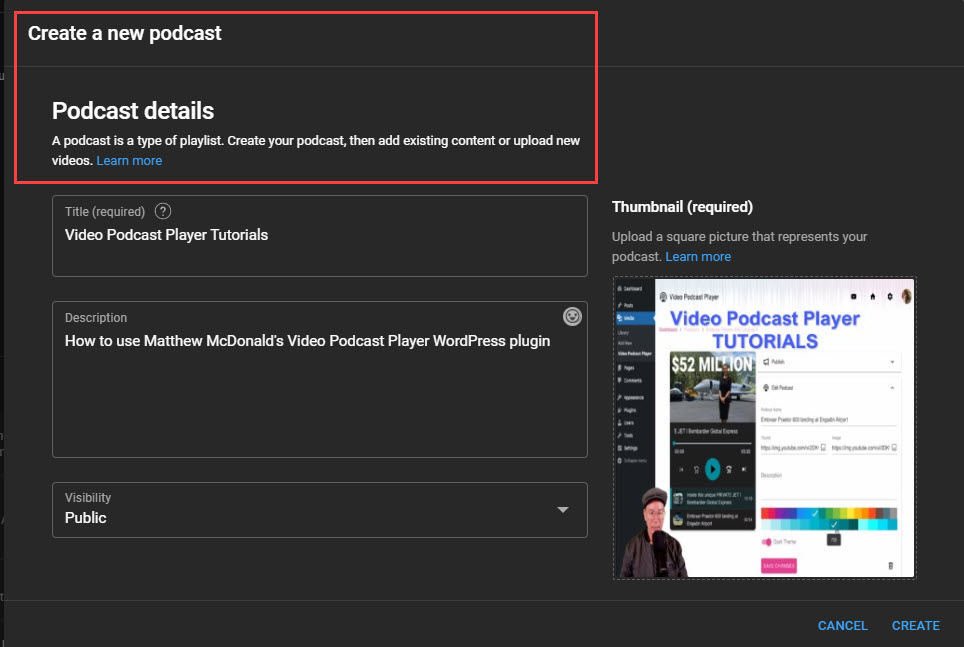
- Set Up Your Podcast Details:
- In the pop-up, choose “Create a new podcast”.
- Enter the following details for your podcast:
- Podcast title: Give your podcast a descriptive name.
- Description: Write a brief summary of your podcast.
- Visibility: Choose between Public or Private.
- Square podcast thumbnail: Upload an image that represents your podcast visually.
- Click “Create” to save your podcast.
- Add Episodes:
- Once your podcast is created, start adding episodes:
- Upload new or existing videos to your podcast.
- Each video represents an episode.
- Remember that MP3 files cannot be turned into podcasts on YouTube.
- Once your podcast is created, start adding episodes:
- Optimize Existing Playlists (Optional):
- If you have an existing playlist that you want to turn into a podcast, select “Set an existing playlist as a podcast” during the creation process.
- Copyright Considerations:
- Ensure that your content adheres to YouTube’s copyright policies.
- If an episode violates copyright rules, it may not be eligible for podcast features.
Remember, on YouTube, each podcast episode is represented by a video. Podcast videos are available for audio-only playback. To turn off audio-only playback for a video, remove it from all podcasts within your video settings.
See also WP Video Polls | Awesome HLS Video Streaming
Leave a Reply